Stormworks Mod Loader / Mods / Rotation Rings
Rotation Rings
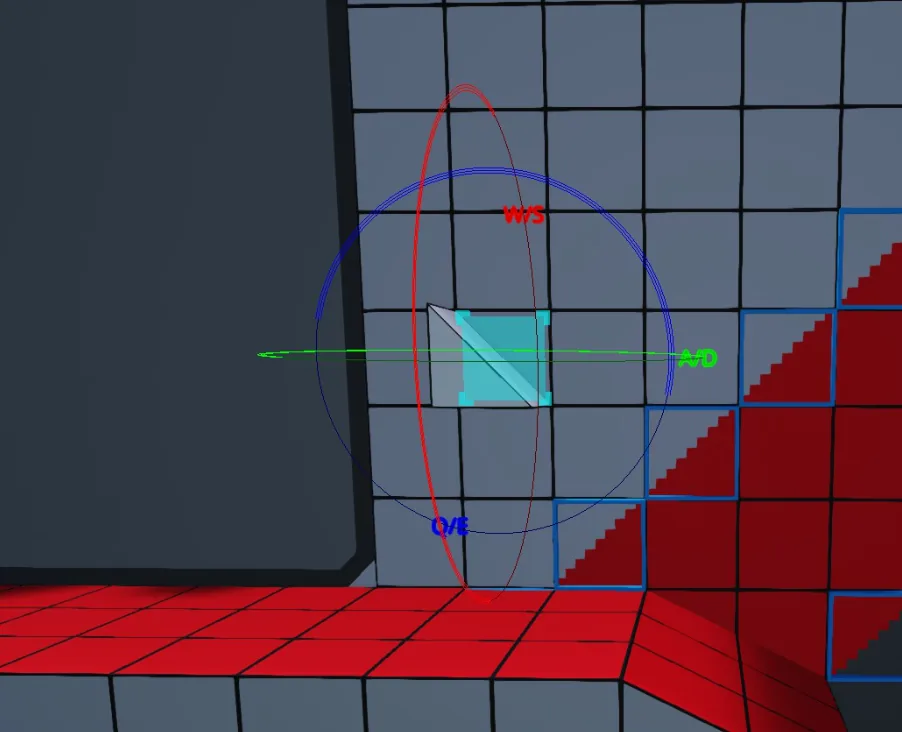
Hold one key in the vehicle editor and turn the part with your movement keys, relative to where you are looking. Coloured rings show which keys turn it which way.
- Latest version
- 1.2.4
- Who installs it
- Only you. It changes your own game, so other players don’t need it and you can join anyone.
- Dedicated servers
- Not needed: it only changes your own screen.
- After adding it
- On straight away.
- In the SWML window
- Listed as Editor Rotation Rings.
- Source
- github.com/kiVts/editor_rotation_rings
What it does
Hold the game’s Show Rotation UI key (rebind it under Controls). While it’s down:
- W / S roll the part away from you or towards you, like a wheel.
- A / D steer it left or right.
- Q / E lay it over onto its side or upside down. Looking down at the part, Q and E spin it flat instead.
The directions are taken from your camera when you press the key, so they always match what you see. Each ring is labelled with its keys: red for W/S, green for A/D, blue for Q/E. Typing in a text field cancels the hold, so names and labels type normally.
Settings
Change these on the mod’s Settings tab in the SWML window; on a dedicated server, in swml\config\editor_rotation.ini. The value shown is the default. Most changes apply the next time the game starts.
[editor] hold_key=game- The key to hold.
gameuses the game’s Show Rotation UI bind; any other key name works too, such ascapslock,taborlalt. [editor] camera_relative=1- Keys follow your view. 0 = fixed vehicle X / Y / Z axes.
[editor] rings=1- Draw the rings and key labels.
[editor] invert_ws=0- Swap the direction of W/S.
invert_adandinvert_qedo the same for the other pairs.
Install
- Install SWML if you haven’t: see Install.
- Download the zip from the releases page.
- Add it: click Add Mods… in the SWML window and pick the zip.
- Start Stormworks from Steam.
Works well with
- Editor QOLs
- Pipes that connect themselves, Copy and Paste for block settings, mass and size in the Spawn tooltip, and the time spent building each vehicle. All undo with Ctrl+Z.
- Text Fields
- Long names wrap and scroll inside the box instead of running out of it, and typing no longer moves the camera or rotates parts.
- Composite Tracer
- Select a logic node and get every channel of a composite signal: which button or controller writes it, everything that reads it, and why a lead ends.